
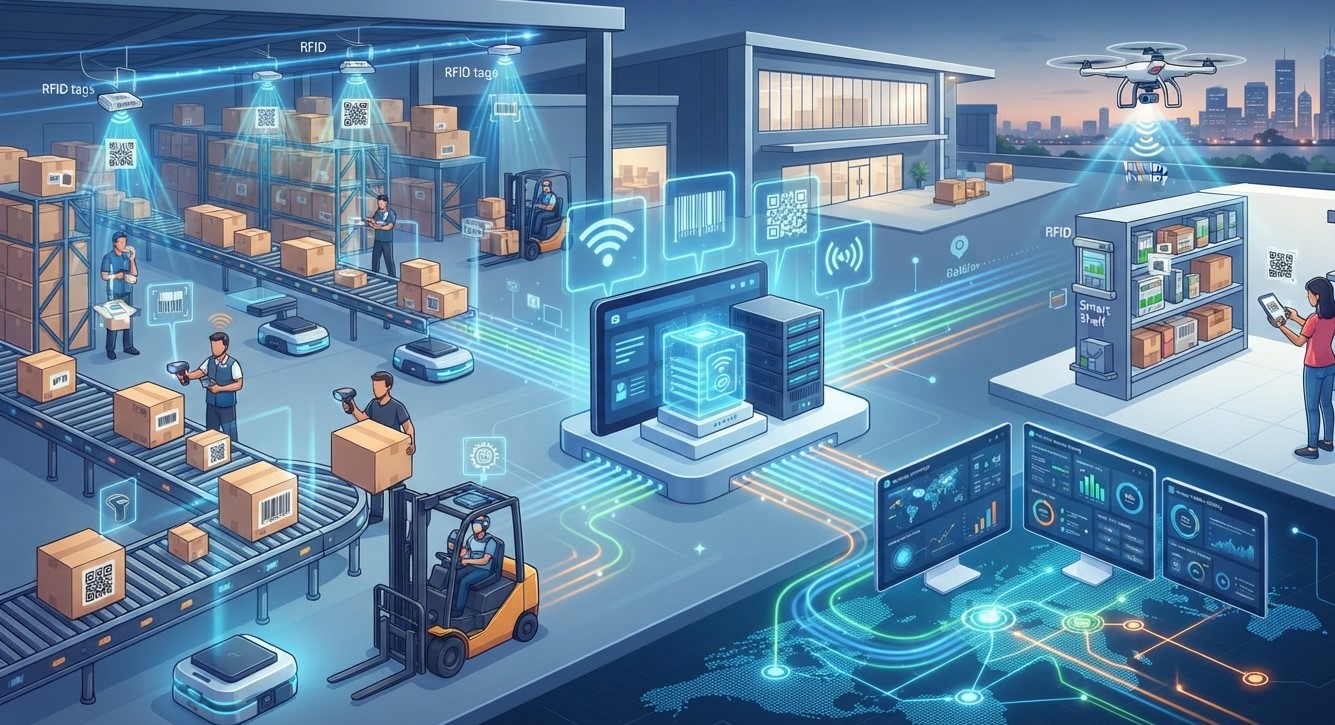
Businesses today handle enormous amounts of information about products, assets, employees, shipments, customers, and equipment. Manually entering and updating this information can consume time and create opportunities for errors. This is where Auto-ID technology becomes valuable. Automatic Identification and Data Capture (AIDC), commonly referred to as Auto-ID, allows businesses to identify objects and capture information automatically using technologies such as barcodes, RFID, mobile computers, and other data-capture solutions.
Pointus Solutions helps businesses explore modern identification and data-capture technologies designed to improve operational visibility and efficiency. From Shop Barcode solutions to professional Printing Products, businesses can build the infrastructure needed to identify products, assets, and other important items more efficiently.
In this guide, we will explain what Auto-ID technology is, how it works, the technologies involved, its benefits, and how businesses can determine where Auto-ID solutions can fit into their operations.
Table of Contents
- What Is Auto-ID Technology?
- How Does Auto-ID Technology Work?
- What Technologies Are Used in Auto-ID?
- How Does Auto-ID Help Businesses?
- Benefits of Auto-ID Technology
- Where Can Businesses Use Auto-ID?
- Barcode vs. RFID in Auto-ID Systems
- How to Choose the Right Auto-ID Solution
- Frequently Asked Questions
- Conclusion and CTA
What Is Auto-ID Technology?
Auto-ID, short for Automatic Identification, refers to technologies that allow businesses to identify objects, products, assets, or other entities and capture related information with minimal manual data entry.
Automatic Identification and Data Capture (AIDC) includes technologies such as barcodes and RFID that enable information to be captured electronically. GS1 describes AIDC data carriers as methods of attaching data to physical objects so that the information can be captured without manual data entry.
For example, when an employee scans a barcode on a product, the scanner captures the encoded information and sends it to a connected software system. The software can then use that information for inventory, sales, receiving, shipping, asset management, or another business process.
Instead of repeatedly typing product codes or asset numbers, employees can capture information using a scan or automated reading process.
How Does Auto-ID Technology Work?
Although Auto-ID systems can vary significantly, the basic process is relatively straightforward:
1. Information Is Assigned
An item, product, asset, location, or other object is assigned an identification number or relevant data.
2. Information Is Encoded
The information is represented through a machine-readable data carrier, such as a barcode or RFID tag.
3. The Data Is Captured
A scanner, RFID reader, mobile computer, or another compatible device captures the information.
4. Data Is Sent to Software
The captured information is transferred to a business application, database, ERP, WMS, POS system, or another platform.
5. The Business Uses the Information
The software can use the captured information to support processes such as inventory management, asset tracking, order processing, receiving, sales, or reporting.
This connection between physical identification and business software is one of the most important characteristics of an Auto-ID system. GS1 notes that AIDC workflows can involve data carriers, capture devices, people, and back-end systems such as ERP and WMS platforms.
What Technologies Are Used in Auto-ID?
Auto-ID is not a single technology. It is a broad category that includes several technologies designed for different environments and requirements.
Barcode Technology
Barcodes are one of the most widely recognized Auto-ID technologies. A barcode represents information through machine-readable patterns that can be captured using optical scanners or imaging devices.
Businesses use different barcode formats depending on their requirements. One-dimensional barcodes use lines and spaces, while two-dimensional barcodes use patterns such as squares or other shapes and can hold more information within a relatively small area.
Barcodes can be used for product identification, inventory processes, logistics, asset tracking, point-of-sale operations, and many other applications.
RFID Technology
Radio Frequency Identification (RFID) uses radio waves to automatically identify objects. An RFID system typically includes tags and readers. The tag contains a chip and antenna, while the reader communicates with the tag and converts the captured information into digital data.
One important difference between RFID and conventional barcode scanning is that RFID can be read without requiring the same direct line of sight associated with optical barcode scanning.
This can make RFID useful for applications where many tagged items need to be identified efficiently.
Mobile Computers
Mobile computers combine computing capabilities with data-capture functionality. Employees can use them to scan barcodes, access applications, update information, and perform business tasks while moving around a facility.
They can be particularly useful in warehouses, distribution centers, retail environments, field operations, and other workplaces where employees need access to business information away from a desk.
Scanners and Data-Capture Devices
Barcode scanners and imaging devices capture machine-readable information and transmit it to connected systems.
Modern data-capture devices can support different types of information depending on their capabilities. Some devices can work with multiple barcode formats and may also support technologies such as RFID or optical character recognition for particular applications.
How Does Auto-ID Help Businesses?
Auto-ID technology can affect several areas of business operations.
Faster Data Capture
Scanning or automatically reading information can be faster than manually entering identification numbers. This can help employees process more items within the same working period.
Improved Data Accuracy
Manual data entry can result in typing mistakes, incorrect product numbers, or duplicated information. Automated capture can reduce the amount of manual entry involved in a process.
GS1 identifies fast and accurate data capture and fewer recognition errors among the business benefits associated with standardized barcode systems.
Better Operational Visibility
When identification data is captured consistently and connected with business software, organizations can gain better visibility into the movement and status of products, assets, or other items.
More Efficient Workflows
Auto-ID can simplify repetitive tasks. For example, an employee may scan an item rather than manually enter its identification number into a computer.
Better Integration With Business Systems
Auto-ID does not have to operate independently. A properly designed system can connect captured information with ERP, WMS, POS, asset management, or other business applications.
Benefits of Auto-ID Technology
The potential benefits depend on the technology and implementation, but common advantages include:
- Reduced manual data entry
- Faster information capture
- Improved data accuracy
- Better product identification
- Improved asset visibility
- More consistent operational processes
- Better access to business information
- Improved traceability
- Greater workflow efficiency
- Easier integration with business software
The greatest value usually comes not from the scanning device itself but from connecting identification technology to useful business processes and systems.
Where Can Businesses Use Auto-ID?
Auto-ID technology can be applied across many industries.
Retail
Retailers can use Auto-ID for product identification, checkout, receiving, stock processes, and other operational activities.
Warehousing and Distribution
Warehouses can use barcode and RFID technologies to identify goods, locations, containers, and assets throughout their operations.
Manufacturing
Manufacturers can use machine-readable identification to support production processes, component identification, quality-related workflows, and traceability.
Healthcare
Healthcare organizations can use identification technologies for products, equipment, supplies, patient-related processes, and other applications where accurate identification is important.
Asset Management
Businesses can identify equipment and other valuable assets using barcodes or RFID tags, allowing employees to associate physical items with digital records.
Transportation and Logistics
Auto-ID can support the identification of shipments, packages, containers, and other logistics units as they move through different stages of a process.
Barcode vs. RFID in Auto-ID Systems
Barcode and RFID are both important Auto-ID technologies, but they operate differently.
| Feature | Barcode | RFID |
|---|---|---|
| Reading method | Optical scanning | Radio frequency |
| Direct line of sight | Generally required for conventional scanning | Not necessarily required |
| Typical identification | Products, packages, assets | Products, assets, containers and other tagged objects |
| Data carrier | Printed label or symbol | Electronic RFID tag |
| Typical cost structure | Generally economical | Depends on tags, readers, infrastructure, and application |
| Best suited for | Many standard identification applications | Applications requiring automated or non-line-of-sight reading |
Neither technology is automatically suitable for every business. The right choice depends on factors such as the environment, number of items, required reading distance, workflow, budget, software integration, and operational objectives.
In some environments, businesses may even use barcode and RFID technologies together. GS1 provides guidance for interoperability between barcode and RFID data carriers.
How to Choose the Right Auto-ID Solution
Businesses should evaluate their actual workflow before selecting Auto-ID technology.
Identify the Problem
Start by determining what needs improvement. Is the business struggling with manual data entry, asset visibility, product identification, or process efficiency?
Determine What Needs to Be Identified
The requirements for identifying individual products may differ from those for tracking equipment, pallets, containers, or other assets.
Consider the Environment
Think about factors such as temperature, dust, moisture, outdoor use, scanning distance, movement, and available network connectivity.
Evaluate Existing Software
The Auto-ID solution should work effectively with the business’s existing ERP, WMS, POS, inventory, asset management, or other relevant software.
Consider Future Growth
A solution should not only address today’s requirements. Businesses should also consider whether the system can support additional users, locations, products, assets, or workflows in the future.
Frequently Asked Questions
What does Auto-ID stand for?
Auto-ID stands for Automatic Identification. The broader term Automatic Identification and Data Capture (AIDC) describes technologies and processes used to automatically identify objects and capture information with reduced manual data entry.
Is barcode technology an Auto-ID technology?
Yes. Barcodes are one of the most common technologies used for automatic identification and data capture. They encode machine-readable information that can be captured using compatible scanners or imaging devices.
Is RFID better than a barcode?
RFID and barcode technologies serve different purposes. RFID can provide capabilities such as non-line-of-sight reading, while barcode systems are widely used for straightforward identification and scanning applications. The appropriate technology depends on the specific business workflow.
Can Auto-ID technology integrate with ERP software?
Yes. Auto-ID workflows can connect data-capture devices with business applications such as ERP and WMS platforms. The exact integration approach depends on the software and solution architecture.
Can small businesses use Auto-ID technology?
Yes. Auto-ID does not have to be limited to large enterprises. Small and growing businesses can use solutions such as barcode labels and scanners for product identification, asset management, sales, and other processes.
Does Auto-ID completely eliminate manual work?
Not necessarily. Auto-ID reduces manual identification and data-entry activities, but employees may still be required to manage exceptions, verify information, make decisions, and perform other operational tasks.
Conclusion
Auto-ID technology provides a practical connection between physical objects and digital business information. By using technologies such as barcodes, RFID, scanners, and mobile computers, businesses can capture identification data more efficiently and connect that information with their operational software.
The right solution depends on what a business needs to identify, how information is currently captured, the operating environment, software requirements, and future growth plans. Barcode technology may be appropriate for many everyday identification applications, while RFID can provide additional capabilities for particular workflows.
For businesses exploring barcode, RFID, identification, and printing solutions, Pointus Solutions can help you understand the technologies and options available for different operational requirements. You can also explore Shop Barcode solutions and related Printing Products to find technologies that can support your business’s identification and data-capture needs.
Ready to Explore Auto-ID Solutions?
Looking to improve how your business identifies products, assets, or other operational items?
Explore Pointus Solutions for barcode, RFID, scanning, printing, and business technology solutions tailored to your operational requirements. Visit the Pointus Solutions website or explore the Shop Barcode section to discover suitable solutions for your business.
 lifestyleandmobility
  edwardbrown
  dmktg42 singhal