
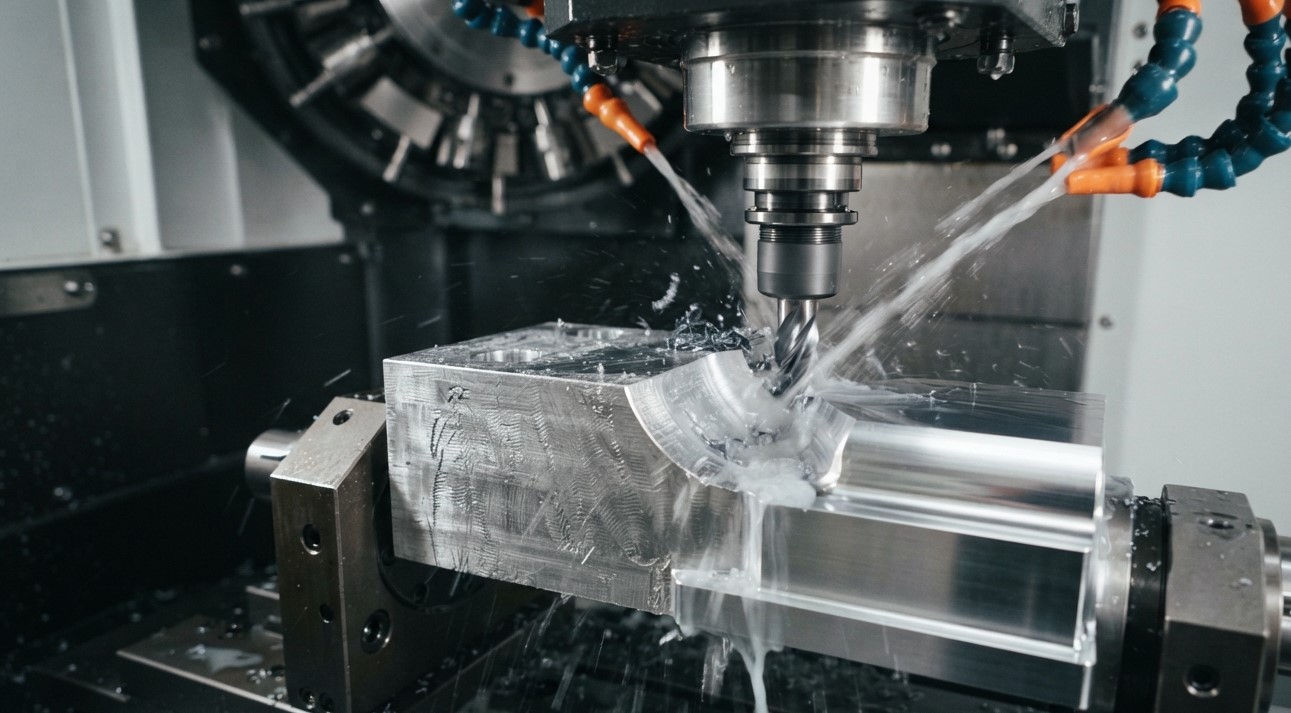
Achieving a smooth, consistent surface finish is an important part of CNC machining. Even when a machine is programmed correctly, problems with cutting tools, machining parameters, tool runout, vibration, workholding, coolant, or toolpath strategy can result in rough or inconsistent surfaces. For manufacturers, understanding the cause of these problems is essential for maintaining part quality and reducing rework.
Khokhawala Trading LLC, an experienced Industrial Tools Supplier in Dubai, provides industrial tooling and machining solutions for a wide range of professional applications. Choosing the appropriate cutting tool and maintaining the right machining conditions can make a significant difference in surface quality.
Poor CNC surface finish can appear as roughness, visible tool marks, chatter lines, scratches, burrs, or inconsistent textures. The correct solution depends on the type of defect and its underlying cause. Simply reducing the feed rate or increasing spindle speed may not solve the problem if the real issue is tool wear, vibration, runout, or unstable workholding.
This guide explains the common causes of poor CNC surface finish and practical ways to identify and correct them.
Table of Contents
-
What Is Surface Finish in CNC Machining?
-
Why Is Surface Finish Important?
-
Common Causes of Poor CNC Surface Finish
-
How Cutting Parameters Affect Surface Finish
-
How Tool Wear Affects Surface Finish
-
Chatter and Vibration Problems
-
Tool Runout and Tool Deflection
-
Workholding and Machine Rigidity
-
Coolant and Chip Evacuation
-
Toolpath and Programming Issues
-
How to Troubleshoot Poor Surface Finish
-
How to Improve CNC Surface Finish
-
Frequently Asked Questions
-
Conclusion and CTA
What Is Surface Finish in CNC Machining?
Surface finish describes the texture and irregularities present on a machined surface after a manufacturing operation.
A machined surface is not perfectly smooth at a microscopic level. Cutting tools leave small variations or patterns as they move across the workpiece. Depending on the application, these characteristics may be acceptable or may need to be controlled within a specified surface roughness requirement.
Surface finish can be evaluated using measurements such as Ra (average surface roughness) and other roughness parameters. Visual inspection can identify obvious defects, but when a drawing specifies a numerical roughness requirement, an appropriate measuring instrument should be used rather than relying only on appearance.
Why Is Surface Finish Important?
Surface finish is not simply an aesthetic consideration. The required finish can be important for the function and performance of a machined component.
A suitable surface finish can help with:
-
Proper component assembly
-
Consistent dimensional performance
-
Reduced friction in applicable components
-
Improved sealing surfaces
-
Reliable contact between mating components
-
Reduced need for additional finishing operations
-
Consistent product quality
The required surface finish varies depending on the component, material, machining operation, engineering specification, and intended application.
Common Causes of Poor CNC Surface Finish
Several factors can contribute to poor surface quality. The most common include:
-
Worn or damaged cutting tools
-
Incorrect cutting speed
-
Incorrect feed rate
-
Excessive depth of cut
-
Tool runout
-
Tool deflection
-
Excessive tool overhang
-
Machine vibration
-
Chatter
-
Poor workholding
-
Inadequate coolant
-
Poor chip evacuation
-
Incorrect tool geometry
-
Unsuitable toolpath
-
Spindle or machine problems
These factors can also interact with each other. For example, excessive tool overhang can increase deflection, while increased deflection can contribute to vibration and poor surface finish.
How Cutting Parameters Affect Surface Finish
Cutting parameters are among the first things machinists often check when surface quality deteriorates.
Feed Rate
An excessively high feed rate can leave more noticeable feed marks and increase cutting forces. However, simply lowering the feed rate is not always the correct solution.
An excessively low feed can also create problems. In some applications, the cutting edge may rub rather than remove material effectively, increasing heat and potentially affecting the surface.
The correct feed should be selected according to the cutting tool, workpiece material, tool geometry, machine capability, and machining operation.
Cutting Speed
Cutting speed influences cutting temperature, tool wear, chip formation, and machining performance.
A cutting speed that is too high can accelerate tool wear or increase heat generation. A speed that is too low can contribute to rubbing or built-up edge in some materials.
The appropriate value should therefore be based on tooling recommendations and the specific machining application.
Depth of Cut
An excessive depth of cut can increase cutting forces and contribute to tool deflection and vibration.
During finishing operations, a lighter and controlled cutting engagement is often used to achieve the required dimensional and surface-quality objectives.
How Tool Wear Affects Surface Finish
A cutting tool does not remain in its original condition indefinitely.
As the cutting edge wears, cutting forces and friction can increase. A worn edge may produce more rubbing instead of clean cutting, resulting in roughness, burrs, dimensional changes, or other surface defects.
Signs of Tool Wear
Look for:
-
Rounded cutting edges
-
Flank wear
-
Chipped edges
-
Crater wear
-
Built-up material
-
Unusual cutting sounds
-
Increased spindle load
-
Deteriorating surface finish
If a previously stable machining process begins producing rough surfaces without any changes to the program or setup, inspecting the cutting tool should be one of the first steps.
How to Fix Tool-Related Problems
You may need to:
-
Inspect the cutting edge.
-
Replace or index the worn tool.
-
Check whether the tool grade is suitable for the workpiece material.
-
Verify cutting speed and feed.
-
Check tool runout.
-
Confirm that the tool is correctly installed.
Using an appropriate cutting tool for the material and operation is an important part of maintaining consistent machining performance.
Chatter and Vibration Problems
Chatter is one of the most recognizable causes of poor CNC surface finish.
It can produce regular lines, waves, or repeating patterns on the machined surface. Chatter results from dynamic instability involving the machine, spindle, tool, tool holder, workpiece, fixture, and cutting conditions.
Common Causes of Chatter
-
Excessive tool overhang
-
Weak workholding
-
Poor machine rigidity
-
Excessive cutting load
-
Unsuitable spindle speed
-
Tool runout
-
Large tool engagement
-
Flexible workpieces
-
Worn tooling components
How to Reduce Chatter
Start by checking the mechanical stability of the setup rather than immediately changing feed rate.
Consider:
-
Reducing tool stick-out
-
Improving workpiece support
-
Checking the tool holder
-
Reducing cutting engagement where appropriate
-
Selecting suitable cutting parameters
-
Checking spindle and machine condition
-
Using tooling designed for the required machining application
Chatter can accelerate tool wear as well as damage surface quality, so identifying its source is important.
Tool Runout and Tool Deflection
Tool runout occurs when the cutting tool does not rotate perfectly around its intended centerline.
Excessive runout can cause uneven loading between cutting edges. In a multi-flute milling cutter, one or more flutes may remove more material than others, contributing to inconsistent cutting and premature wear.
How to Check Runout
A suitable dial indicator or precision measurement system can be used to check tool or holder movement while rotating.
Also inspect:
-
Tool holder
-
Collet
-
Spindle interface
-
Tool shank
-
Mating surfaces
Even small amounts of contamination between tooling interfaces can affect tool positioning.
Tool Deflection
Tool deflection occurs when cutting forces cause the tool to bend away from its intended position.
Long tool overhang makes the tool more flexible. Where possible, selecting the shortest practical tool with sufficient reach can improve rigidity and reduce deflection.
Workholding and Machine Rigidity
A cutting tool cannot produce a consistent surface if the workpiece moves during machining.
Poor workholding can cause:
-
Vibration
-
Movement of the workpiece
-
Dimensional variation
-
Chatter
-
Uneven cutting
-
Poor surface finish
Check that the workpiece is securely supported and that the fixture or clamping system is appropriate for the machining operation.
Thin-walled or flexible components may require additional support because cutting forces can cause them to deflect.
Machine condition also matters. Worn components, spindle problems, loose mechanical elements, or other machine issues can affect machining stability.
Coolant and Chip Evacuation
Coolant and lubrication can influence cutting temperature, friction, tool life, and chip evacuation.
If chips are not removed effectively, they can become trapped in the cutting zone and potentially be recut or pressed against the machined surface. This can produce scratches and other surface defects.
Check the Following
-
Coolant flow
-
Coolant direction
-
Nozzle position
-
Coolant condition
-
Chip evacuation
-
Cutting-zone coverage
The correct coolant strategy depends on the workpiece material, cutting tool, machine, and machining operation.
Toolpath and Programming Issues
Even with a good cutting tool and stable machine, the toolpath can affect surface quality.
Problems may occur because of:
-
Excessive step-over
-
Abrupt toolpath transitions
-
Inconsistent tool engagement
-
Poor finishing strategy
-
Incorrect feed during corners
-
Unnecessary changes in cutting direction
For finishing operations, the toolpath should be selected according to the geometry of the component and the required surface quality.
In some cases, changing the finishing strategy can produce a greater improvement than simply changing spindle speed or feed rate.
How to Troubleshoot Poor Surface Finish
When a CNC-machined surface suddenly becomes rough, avoid changing multiple parameters at the same time. A systematic approach makes it easier to identify the actual cause.
Step 1: Identify the Defect
Look at the surface carefully.
Is it:
-
Regular chatter marks?
-
Random scratches?
-
Visible feed marks?
-
Smearing?
-
Burrs?
-
Uneven between different areas?
Different appearances can point toward different causes.
Step 2: Inspect the Cutting Tool
Check for wear, chipping, built-up material, or damage.
Step 3: Check Tool Runout
Inspect the tool holder, collet, spindle interface, and cutting tool.
Step 4: Check Tool Overhang
Reduce unsupported tool length where practical.
Step 5: Check Workholding
Make sure the workpiece and fixture are rigid and secure.
Step 6: Review Cutting Parameters
Check:
-
Spindle speed
-
Feed rate
-
Feed per tooth
-
Depth of cut
-
Radial engagement
Compare them with appropriate tooling recommendations.
Step 7: Check Coolant and Chips
Make sure coolant reaches the cutting zone and chips are being removed effectively.
Step 8: Review the Toolpath
Check finishing passes, step-over, tool engagement, and transitions.
Step 9: Make One Controlled Change
Change one major variable at a time and evaluate the result. This makes it easier to determine which adjustment actually improved the process.
How to Improve CNC Surface Finish
For consistent results, consider the following best practices:
-
Use suitable cutting tools for the workpiece material and operation.
-
Keep tools sharp and replace worn tools before they cause quality problems.
-
Minimize tool overhang whenever possible.
-
Control tool runout through proper tool-holder maintenance.
-
Use secure and rigid workholding.
-
Select appropriate cutting parameters based on tooling recommendations.
-
Control chatter and vibration.
-
Maintain proper coolant delivery.
-
Ensure effective chip evacuation.
-
Use an appropriate finishing toolpath.
-
Monitor surface finish and dimensional trends.
-
Measure surface roughness when a numerical specification is required.
The key is to treat surface finish as a complete machining-system issue rather than assuming that one parameter is always responsible.
Frequently Asked Questions
What is the most common cause of poor surface finish in CNC machining?
Common causes include tool wear, incorrect cutting parameters, chatter, vibration, tool runout, excessive tool overhang, poor workholding, inadequate coolant, and unsuitable toolpaths. The actual cause should be identified from the specific surface defect and machining conditions.
Does increasing RPM improve CNC surface finish?
Not always. Higher spindle speed can improve surface quality in some applications, but it can also increase heat and tool wear. Surface finish depends on the interaction between spindle speed, feed, tool geometry, workpiece material, tool engagement, rigidity, and other conditions.
Can a worn cutting tool cause a rough surface?
Yes. A worn or damaged cutting edge can increase friction and cutting forces and may produce rougher surfaces, burrs, dimensional variation, or other defects.
How does tool runout affect surface finish?
Excessive runout can cause uneven cutting-edge engagement and loading. This can contribute to inconsistent cutting, vibration, accelerated tool wear, and poor surface quality.
Why does CNC machining produce chatter marks?
Chatter marks are commonly associated with vibration and dynamic instability in the machine-tool-workpiece system. Tool overhang, workholding, cutting parameters, tool engagement, and machine rigidity can all influence chatter.
Does feed rate affect surface roughness?
Yes. Feed rate affects the marks left by the cutting tool and can influence cutting forces and surface roughness. However, lowering feed rate is not a universal solution because other factors such as tool wear, runout, vibration, and toolpath can also be responsible.
How can I get a smoother CNC finish?
Use an appropriate finishing tool, maintain low and controlled tool runout, minimize tool overhang, ensure rigid workholding, use suitable cutting parameters, control vibration, maintain effective coolant delivery, and use a suitable finishing toolpath.
How do I know whether the problem is the tool or the machine?
Start by inspecting the cutting tool and holder, then check runout, workholding, vibration, and machine condition. If multiple tools show similar problems under otherwise unchanged conditions, the machine, spindle, holder, or setup may require further investigation.
Conclusion
Poor surface finish in CNC machining can result from many different factors, including tool wear, incorrect cutting parameters, chatter, vibration, tool runout, tool deflection, poor workholding, inadequate coolant, chip recutting, and unsuitable toolpaths.
The most effective solution is to identify the actual cause instead of making random adjustments. Start by examining the surface defect, inspect the cutting tool and tooling system, check machine and workpiece stability, review machining parameters, and then make controlled changes.
Selecting the right cutting tools and maintaining the complete machining setup can help improve consistency, reduce rework, and support better production results.
Khokhawala Trading LLC offers industrial tooling and equipment for professional machining and workshop applications. As an Industrial Tools Supplier in Dubai, the company can support businesses looking for suitable industrial tools and machining solutions for different applications.
 truma3491
  All Writer Destination